Connect Claude to Postd: setup, example requests and privacy
You connect Postd to Claude by adding a custom connector in Claude under Customize › Connectors with the address https://postd.ai/mcp and signing in to Postd. After that Claude reads brands, posts, moodboards and the calendar in your Postd and creates posts, board objects and dates there.
That makes Postd no Instagram connector. Claude does not post to Instagram itself, direct publishing is built and waits for approval from Meta. Claude designs, you publish.
How to connect Claude to Postd
- Open Claude in the browser or the desktop app and go to Customize › Connectors › Yours.
- Click Add, choose "Add custom connector", name it Postd and enter https://postd.ai/mcp as the address.
- Click Connect. Postd opens, you sign in and allow access.
- In a chat, turn Postd on in the tools menu if it is not on already.
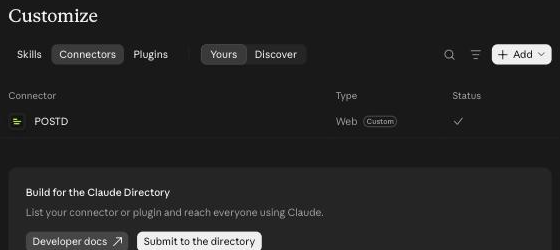
As of 1 November 2026, checked in claude.ai. Claude renames its menus now and then (the path used to be Settings › Connectors), the path stays the same: add the address, sign in to Postd, allow. Connecting works on every plan.
Claude Code
In Claude Code you add the server with one command:
claude mcp add --transport http postd https://postd.ai/mcp
Then open /mcp in Claude Code, pick Postd and sign in.
ChatGPT, Codex and Gemini
- ChatGPT: Settings › Apps & Connectors › Advanced, turn on developer mode, then under Apps & Connectors click Create with name Postd, MCP server URL
https://postd.ai/mcpand authentication OAuth. Custom connectors are only available on paid ChatGPT plans. - Codex: commands
codex mcp add postd --url https://postd.ai/mcpandcodex mcp login postd. - Gemini: Most reliable with Gemini CLI. Add Postd to
~/.gemini/settings.json(fieldhttpUrlwith the address above) and type/mcp auth postd.
The steps per AI with a switcher are also on Connect Postd to your AI.
Example requests for Claude
Select in Postd what it is about (images on the moodboard, a text in the editor, posts in the explorer), because Claude sees your selection. Then, for example:
- "Read my moodboard and build an eight-slide carousel in my brand's look."
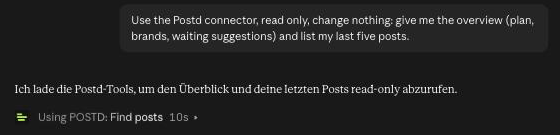
- "Look at my last five posts, suggest three new topics and put dates on the calendar."
- "Get the images from this Instagram post and build a new post in the brand kit."
- "Create a shoot plan for next week and link it to the posts."
- "Turn my board selection into a system, for example a pipeline, a table or a flowchart."
If Postd is open the result is there within seconds. If it is closed, Postd builds it the next time you open it.
What Claude may do in Postd
| Area | What Claude does there |
|---|---|
| Read | Brands, brand kits, posts, moodboards, calendars, shoot plans and your current selection. |
| Order work | New posts, text changes, board objects, presentations, new brand kit colours, posts on the calendar. A post meant for publishing waits on the calendar for your approval. |
| Organise | Create folders, file, rename, move to the trash (restorable for 14 days). |
| Never | Publish without your approval in the calendar, or delete for good. Change account, payment, password, team or channels. |
Data and privacy
- Claude works with your Postd sign-in. It sees and changes only what your own account may see and change.
- Claude runs on your account with its provider. What the provider does with your data is governed by your agreement with it.
- You can disconnect at any time in Postd, tab Claude, under Connected AIs.
- More in the privacy policy.
If something goes wrong
- Claude does not know Postd in the chat: Turn Postd on in the chat's tools menu.
- Sign-in stops: Check the address for typos (https://postd.ai/mcp), remove the connector in Claude and add it again.
- Requests are rejected: Postd limits calls per minute and plan. Wait a moment and send the request again.
- The result is missing in Postd: Open Postd. A closed Postd builds the request the next time you open it.
What Postd is not
- Not a publishing agent: direct publishing to Instagram is built and waits for approval from Meta. You plan on the calendar and upload yourself at the scheduled time.
- Not an analytics tool: no statistics, no inbox, no management of comments and messages.
- No ad management: for Meta ads Postd designs the graphics, you upload them in Ads Manager.
If you want Claude to schedule and publish across several networks, other vendors are in the comparison of Instagram tools with Claude.
FAQ
How do I connect Claude to Postd?
In Claude, go to Customize › Connectors, add a custom connector with the address https://postd.ai/mcp, click Connect and sign in to Postd. In Claude Code the command claude mcp add --transport http postd https://postd.ai/mcp is enough.
Can Claude post to Instagram through Postd?
No, not today. Claude builds posts, boards and dates in your Postd. Direct publishing to Instagram is built and waits for approval from Meta. You upload your post yourself at the scheduled time.
What may Claude read and change in my Postd?
Read: brands, brand kits, posts, moodboards, calendars and your current selection. Order work: new posts, text changes, board objects, presentations, brand kit colours and calendar entries. Organise: create folders, file, rename and move to the trash. Claude never changes account data, payment, password, team or channels.
Can I undo what Claude built?
Yes. The Claude tab in Postd shows the history and Undo takes changes back. Deleted posts stay in the trash for 14 days.
Which other AIs can connect to Postd?
ChatGPT, Codex and Gemini. The steps are below and on the page Connect Postd to your AI.