Meta Ad Sizes and Creative Assets in 2026
Free tool: Meta Ads Safe Zone Checker. Check a Stories or Reels ad against Meta's margins.
The short answer
For image ads on Facebook and Instagram you need two files per idea: a 4:5 image for Feed and a 9:16 image for Stories and Reels. Add a 1:1 file when you build a carousel that also runs on Facebook. Meta lists 1440 x 1800 pixels (4:5) and 1440 x 2560 pixels (9:16) as its recommended sizes. 1080 x 1350 and 1080 x 1920 are accepted too. Image files are JPG or PNG, up to 30 MB.
- Feed: 4:5, 1440 x 1800 recommended, 1080 x 1350 works.
- Stories and Reels: 9:16, 1440 x 2560 recommended, 1080 x 1920 works.
- Carousel: 2 to 10 cards, every card in the same ratio, at least 1080 x 1080 pixels.
- 9:16 safe zone: keep 14 percent at the top, 35 percent at the bottom and 6 percent on each side free of text and logos.
The numbers come from Meta's ad guide and were checked on 5 October 2026. Meta changes specs without announcement, so the sources are linked at the bottom of this page.
What "Meta ads assets" means
Two different things get called assets in Meta's tools. In Business Manager, assets are the things you own or manage: Pages, ad accounts, Instagram accounts, pixels and catalogs. In Ads Manager, creative assets are the files and texts inside an ad: images, videos, headlines and primary text. This guide is about the second kind. It tells you which files to prepare before you open Ads Manager.
The three ratios at a glance
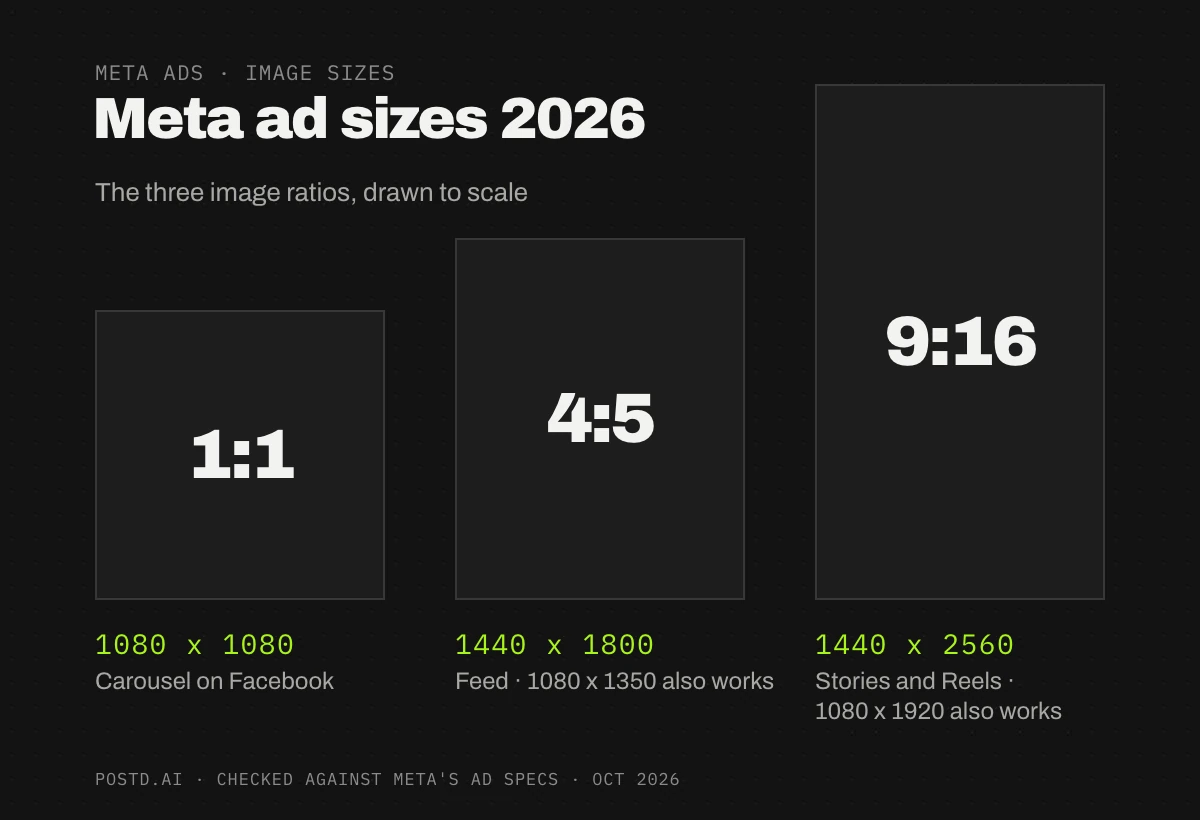
Spec table by placement
| Placement | Ratio | Recommended size | Good to know |
|---|---|---|---|
| Facebook Feed, image | 4:5 | 1440 x 1800 | Minimum 600 pixels wide. Ratio tolerance 3 percent. |
| Instagram Feed, image | 4:5 | 1440 x 1800 | Minimum 500 pixels wide. Accepts ratios from 4:5 up to 1.91:1. Tolerance 1 percent. |
| Instagram Stories, image | 9:16 | 1080 x 1920 or larger | Same canvas and safe zone as Reels. |
| Instagram Reels, image | 9:16 | 1440 x 2560 | Minimum 500 pixels wide. Tolerance 1 percent. |
| Carousel on Facebook Feed | 1:1 | At least 1080 x 1080 | 2 to 10 cards. Tolerance 3 percent. |
| Carousel on Instagram Feed | 1:1 or 4:5 | At least 1080 x 1080 | 2 to 10 cards. Image cards can be 4:5, video cards 1:1. Tolerance 1 percent. |
Every image ad is a JPG or PNG up to 30 MB. Video ads follow different rules and are not covered here. In a carousel, every card must share one ratio, and each card has its own headline and link. If the carousel also runs on Facebook, 1:1 is the safe choice, because Meta's Facebook carousel spec lists 1:1.
1080 or 1440 pixels?
Most guides, and the default export of most editors, say 1080 x 1350 and 1080 x 1920. Meta's current specs recommend 1440 pixels on the short side. Both are accepted, because Meta only enforces a minimum width of 500 or 600 pixels. The ratio decides whether your ad gets cropped. The pixel count decides how sharp it looks on large screens. If your editor exports 1440 wide, use it. If it stops at 1080, you are fine. Anything below 1080 wide tends to look soft once Meta scales it up.
Safe zones for Stories and Reels
In Stories and Reels, Meta puts its own interface on top of your image: the account name and the Sponsored label at the top, the caption and the call-to-action button at the bottom, and icons along the right edge. Meta's spec for Reels image ads asks you to keep about 14 percent at the top, 35 percent at the bottom and 6 percent on each side free of text, logos and key elements. Use the same margins for Stories. One set of margins keeps the workflow simple.
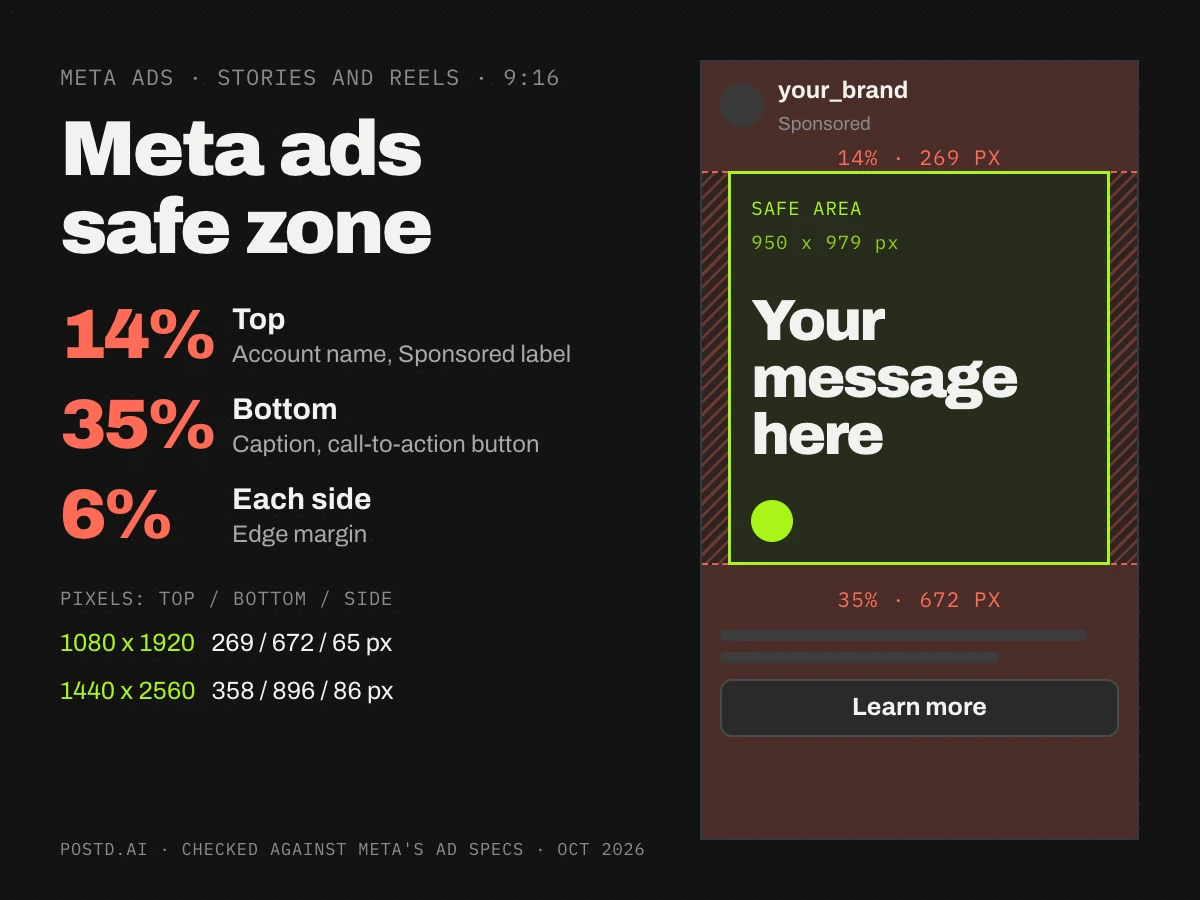
| Canvas | Top | Bottom | Each side | Safe area |
|---|---|---|---|---|
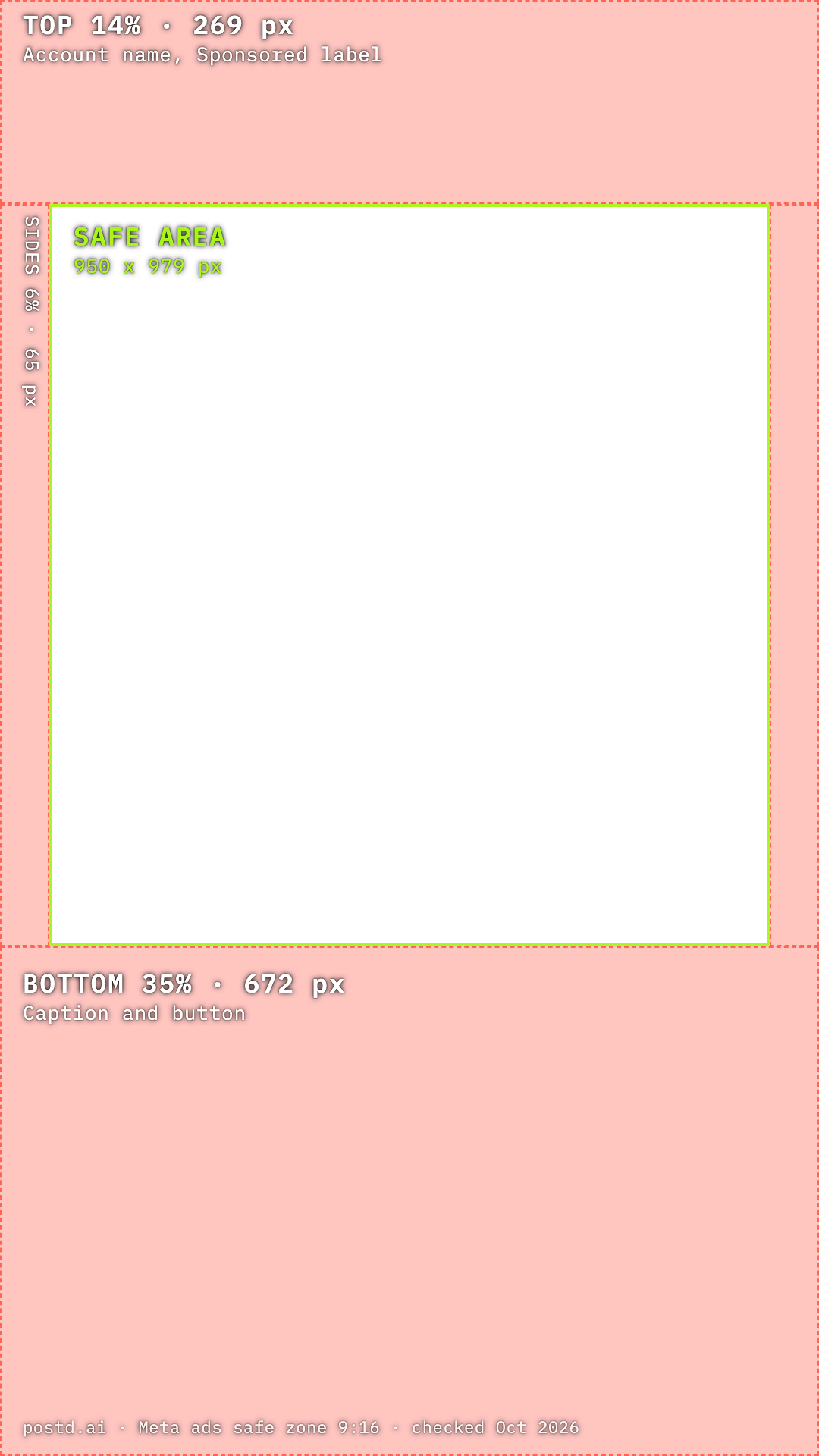
| 1080 x 1920 | 269 px | 672 px | 65 px | 950 x 979 px |
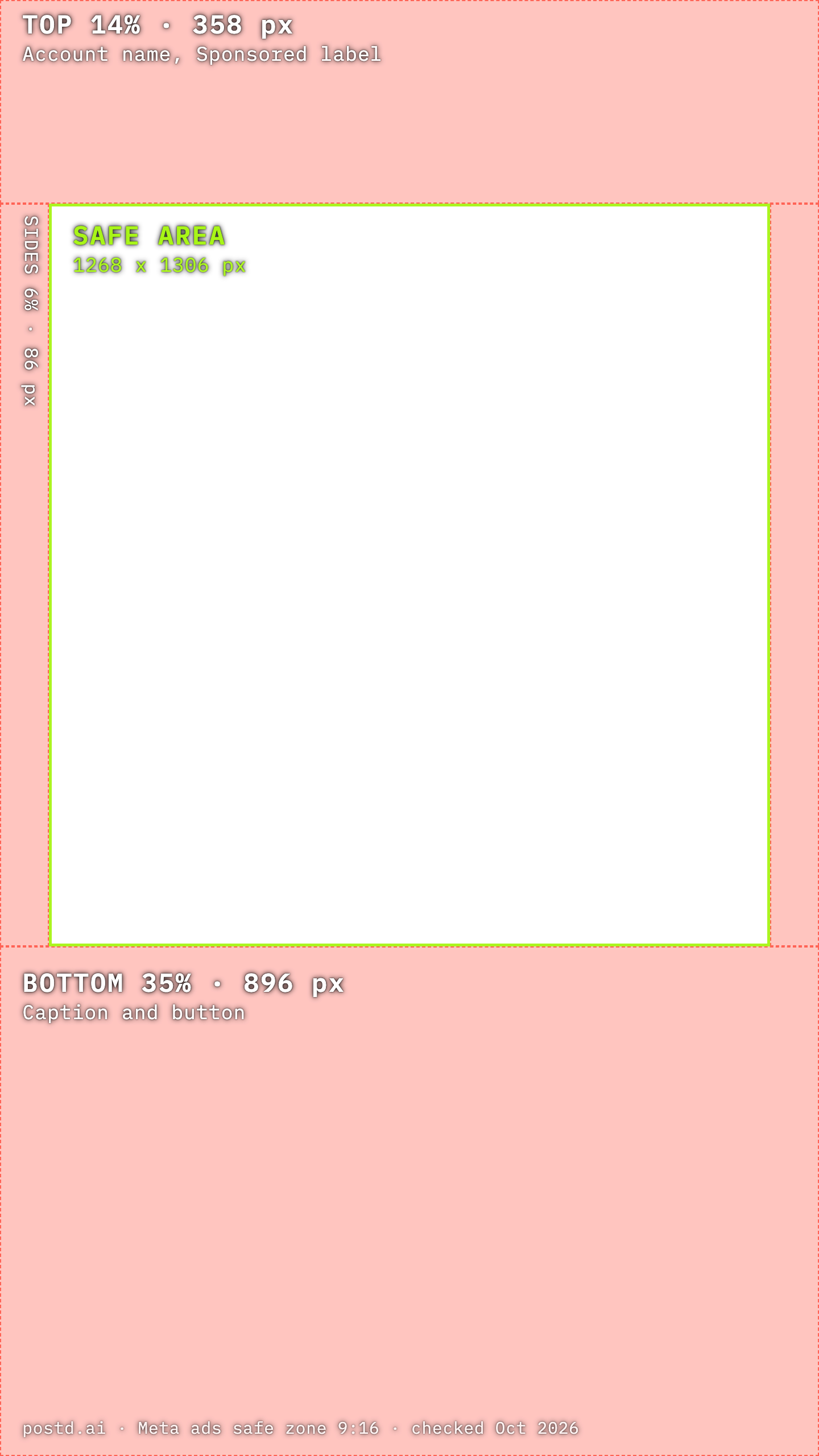
| 1440 x 2560 | 358 px | 896 px | 86 px | 1268 x 1306 px |
The safe area is about half the height of the frame. Design the 9:16 version for that area. Stretching the 4:5 layout taller puts the headline where the button will be.
Feed: the whole image is yours
In Feed, the account name sits above the image, and the headline and button sit around it, not on it. Nothing covers your picture. Keep the headline and the logo about 5 percent away from the edges anyway. Meta tolerates only a 1 to 3 percent deviation from the exact ratio, so export the exact canvas instead of cropping by eye.
Text: how much fits
Meta's Instagram Feed spec recommends 125 characters for the primary text and 40 for the headline. On Facebook Feed the recommended headline is shorter, 27 characters. Carousel card headlines get cut off even earlier on a phone, so write them short.
Text inside the image is a separate question. Meta retired its old 20 percent text rule in 2020, and text-heavy images are no longer rejected for it. Short text still reads better on a phone. A 1080 pixel wide image is shown at about a third of its size, so 36 pixel text lands near 13 points on screen. Treat 36 pixels as the smallest text on the canvas and keep headlines between 80 and 140 pixels.
Send the right file to the right placement
If you upload one 4:5 image and leave placements on automatic, Meta also shows it in Stories and Reels and adapts it with a crop or blurred bars. To control the result, upload two versions and assign them by placement. Meta calls this placement asset customization, and the menu labels change between Ads Manager versions. In the creative step you choose to customize by placement, then add the 9:16 file for Stories and Reels and the 4:5 file for Feed.
The asset checklist for one ad idea
- A 4:5 image, 1440 x 1800 or 1080 x 1350, as JPG.
- A 9:16 image, 1440 x 2560 or 1080 x 1920, with the safe zone respected.
- A 1:1 image or a 1:1 carousel, only if the ad also runs on Facebook.
- Two or three primary texts and headlines to test.
- A destination URL with UTM parameters, so your analytics show which ad got the click.
- File names that say what is inside, for example
brand_offer-v1_4x5.jpg. - A look at every file on a real phone before you publish.
Making all sizes in Postd
In Postd you choose the format per project: 4:5 Post, 9:16 Story, 1:1 Square, or a custom size between 200 and 8000 pixels. Design the 4:5 version and export it. Then switch the project to 9:16. Your elements stay on the slide, and you rearrange them for the taller frame. JPG at 1080 pixels wide is available on every plan. PNG, 2x resolution and custom widths come with Pro, so a custom size of 1440 x 1800 exports at Meta's recommended Feed size there.
One thing to know: the Safe zones overlay in the editor marks Instagram's own interface for Stories and Reels. It covers about the top 13 percent, the bottom 21 percent and the icon column on the right. Meta's margin for ads is larger at the bottom, 35 percent. The overlays below carry Meta's numbers. Place one above your design as a guide and hide it before you export.
FAQ
What is the best image size for Meta ads in 2026?
Use 4:5 for Feed and 9:16 for Stories and Reels. Meta recommends 1440 x 1800 and 1440 x 2560 pixels. 1080 x 1350 and 1080 x 1920 are accepted.
Can I use one image for Feed and Stories?
You can, but in the tall placements Meta then crops the image or fills the empty space with blurred bars. Two files, one per ratio, look better and let you respect the safe zone.
What is the safe zone for Meta Reels and Stories ads?
About 14 percent at the top, 35 percent at the bottom and 6 percent on each side. On a 1080 x 1920 canvas that is 269, 672 and 65 pixels.
How many cards can a carousel ad have?
Two to ten. Every card in one carousel must share the same ratio, and each card has its own headline and link.
Which file types does Meta accept for image ads?
JPG and PNG, up to 30 MB per image.
Sources and more on Meta ads
Official specs, checked 5 October 2026: Meta ads guide, image ads, image ads on Instagram Reels and carousel ads. Meta's pages are localized and change without notice, so check them before a big campaign.
Next in this series: how to create Meta ads step by step, eight paid ad graphic layouts and what a Meta ads generator can and cannot do. Posting organically instead? See the Instagram carousel size guide, which covers the profile grid crop that ads do not have.
Build both sizes in one project
Set the format, build the 4:5 version, switch to 9:16 and export both. Open the editor, or see what each plan includes on the pricing page.